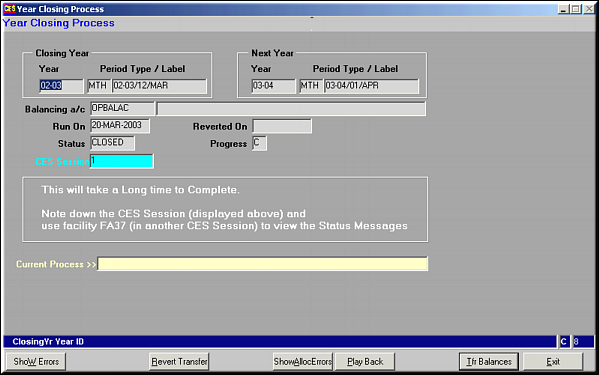
Select year to close.
| Year Closing Process (FA34) | Previous Top Next |
| Function | Facility to rollover accounts from one year to another transferring balances of previous year to the next year. |
| How To Use | Close Year Select year to close. |
| Trf Balances: Click to initiate the year closure process. Does the year rollover showing the account code under process in Current Process. | |
| Show Errors: Click to view errors generated in the rollover process. | |
| Revert Transfer: Click to revert the year rollover process. | |
| Play Back: Click to effect allocation entries made during the current year on vouchers that have been carried over from the previous year. | |
| Show AllocErrors: Click to View errors arising out of Play Back operation. | |
| Pre-requisites | |
| Notes |