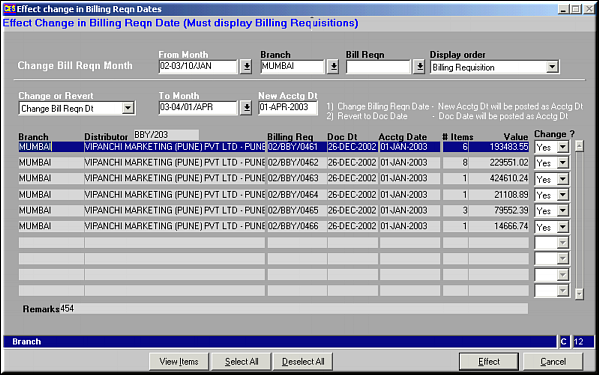
Fields to Enter
| Modify Billing Reqn Date (SO46) | Previous Top Next |
| Function | Facility to modify the billing requisition dates for multiple Billing Requisitions. | |
| How To Use | Modify Date Fields to Enter | |
| From Month | Month from which to select BRs for date change | |
| Branch | Branch from which to select | |
| Bill Reqn | Specific BR No. of it is known | |
| Display Order | Order by which to display | |
| Change or Revert | Whether to change to new date or revert to Doc Date | |
| To Month | Month to change BR date to. | |
| New Acctg Dt | Exact date to set to as accounting date | |
| Change | Yes / No – for each of the BRs listed. | |
| Buttons | View Items: Click to View the Items in the BR.Select All: Click to set change status of all BRs to Yes.Deselect All: Click to set change status of all BRs to No.Effect: Click to effect the change specified.Cancel: Click to clear the screen. | |
| Pre-requisites | ||
| Notes | ||