This set of facilities helps to set up the format of the Balance Sheet in Schedule VI format and also group the accounts so that they are presented in the required manner
The figure below explains the steps for setting up the Schedule and the sub-schedules and linking the accounts.
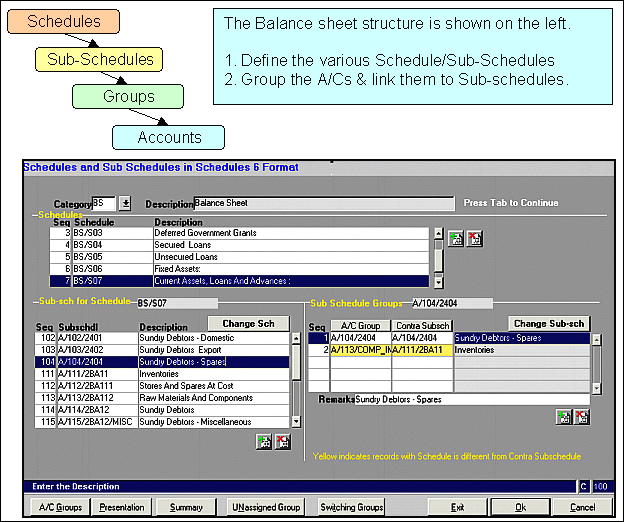
- Use the Contra Sub-schedule to display (-) Negative balances in a different
- Schedule viz. Suppliers where you have a Debit balance should be shown under Other Advances
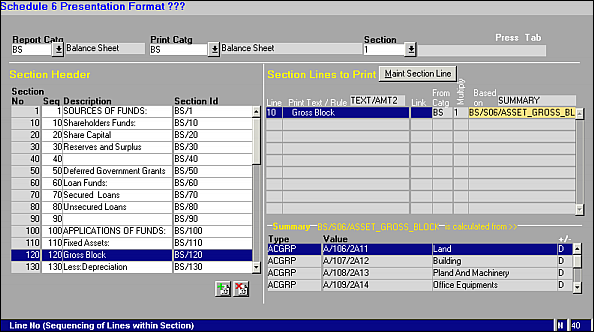
The next figure explains how the Presentation setup is defined in the Schedule VI format so that the Balance sheet is made available in Excel.
The Presentation Layer setup is divided as follows
- Balance Sheet (BS)
- Schedules
- Sub-Schedules
- Disclosures
You can specify for each of the above Layers the following
Define one or more Sections (a Sections can consist of many Lines)
For each line within the section
- The text
- The amount which may be one of a Schedule Total , or a Sub-Schedule total or a Total of Account group or A Total of Account balance or A Summary total
A Summary is defined as the sum total of a set of Schedules/Sub-Schedules/AC Groups / Sections