| Function | Create a Stock Ledger and Register its parameters for run. |
| | |
| How To Use | |
| | |
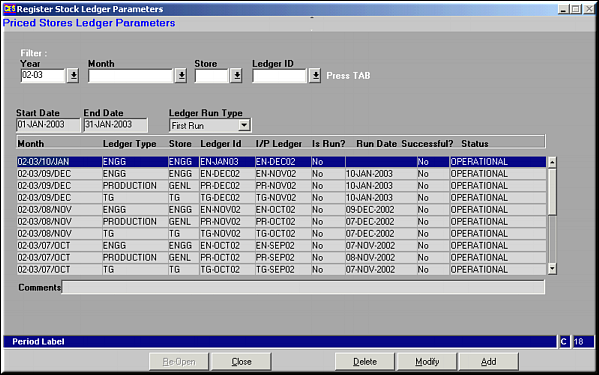
| Query Screen | Enter the criteria to filter by and press List of Available Stock Ledgers
|
| | |
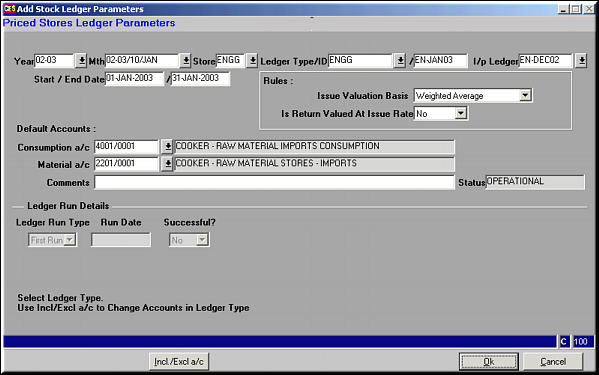
| Add | Add Ledger and Parameters
Fields to be Entered |
| | Year | Year ID |
| | Month | Period of Ledger Run |
| | Store | E.g. ENGG/GENL |
| | Ledger Type | Template Applicable |
| | Ledger ID | ID to be used |
| | Start and End Date | |
| | Issue Valuation Basis | Weighted Average / LIFO / FIFO |
| | Is Return Valued at Issue Rate | Yes / No |
| | Default Consumption A/c | |
| | Default Material A/c | |
| | |
| Incl/Excl A/c | Click to include / exclude accounts to this ledger.Account Inclusion/Exclusion
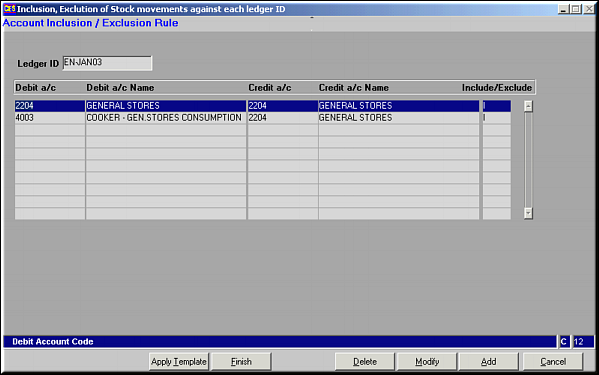
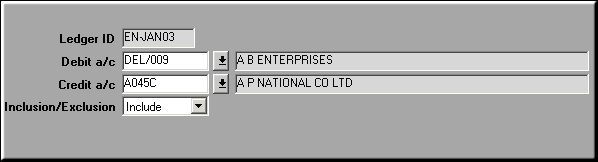
List of Accounts included/excluded is seen. Click Apply Template to view a list of templates that may be applied. Click OK in the list to apply the template.Use Add, Modify and Delete Buttons to manipulate the list of accounts to include/exclude.Add Account to Include/Exclude
|
| | |
| Modify | Click to modify Ledger Parameters. Screen similar to Add facility is seen. Make necessary changes and click OK to save. |
| | |
| Delete | Click to delete a Ledger. Screen shows Ledger details. Click OK to confirm deletion. |
| | |
| Close | Click to close the ledger after finalizing. |
| | |
| Re-open | Click to reopen a closed ledger. |
| | |
| Pre-requisites | |
| | |
| Notes | |