| Function | Facility to set up product pricing by branch for all distributors. |
| | |
| How To Use | Pricing Across Branches By Product
|
| | |
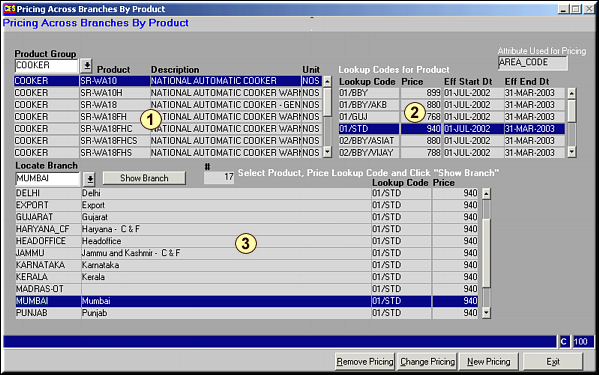
| | Enter the Product Group to get a list of products under that group in Area 1 and associated Price Lookups for each of these products in Area 2.Highlight the Product and the Lookup for modification and click Show Branch to get a list of all branches for the above Product-Price Lookup Combination. Use Locate Branch to locate a specific branch. |
| | |
| Remove Pricing | Remove Pricing for Branch
|
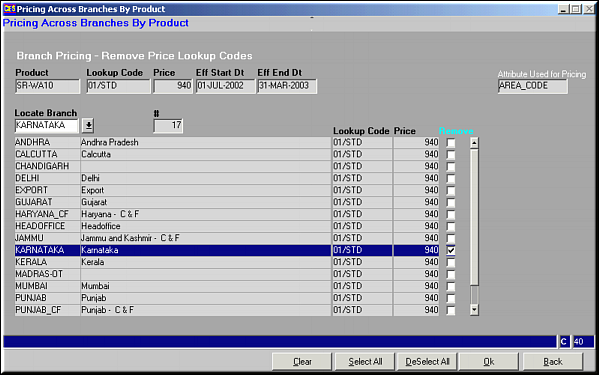
| | Given is a List of all branches for Product-Price Lookup Combination. Locate branch using Locate Branch. Select using  and click OK to save.This removes the pricing for all distributors under the branch. and click OK to save.This removes the pricing for all distributors under the branch. |
| | |
| Change Pricing | Change Pricing for Branch
|
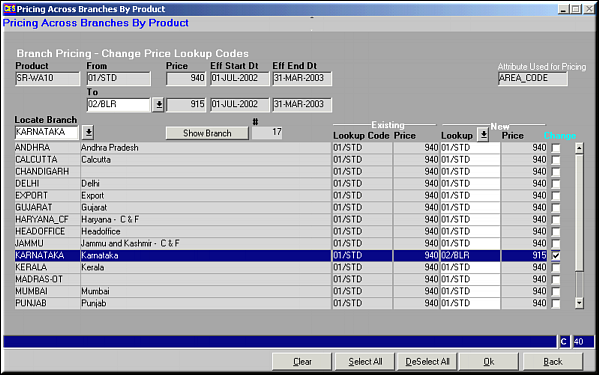
| | Enter the Price Lookup Code to change to locate the branch to effect price change. Select using and click OK to save. |
| | |
| New Pricing | Introduce New Pricing
|
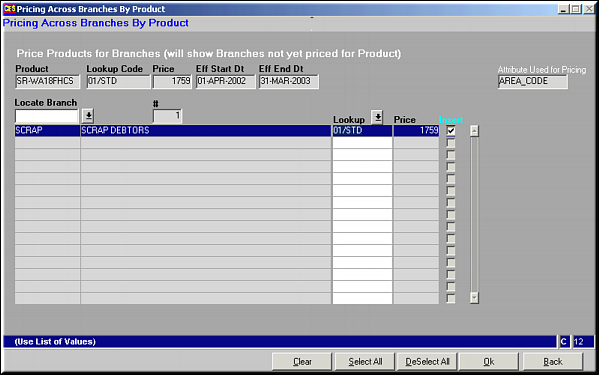
| | Locate the branch for which new pricing is to be introduced. Select using and click OK to save. |
| | |
| Pre-requisites | |
| | |
| Notes | Click Clear to clear the screen.Click Select All to select all Distributors.Click Deselect All to deselect all distributors. |