| Function | Facility to setup the pricing of products across distributors. |
| | |
| How To Use | Pricing Across Distributors By Product
|
| | |
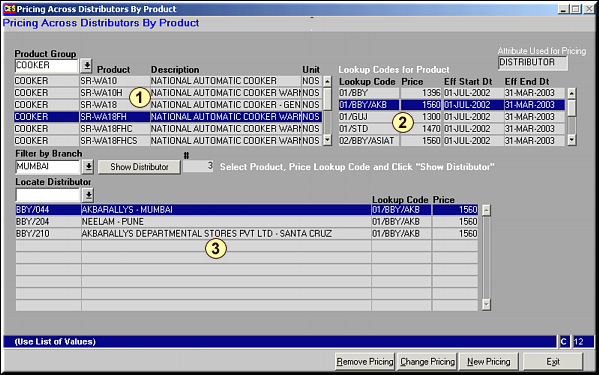
| | Enter the Product group to get a list of all products in that grouping in Area 1 and the Lookup Codes in Area 2. Highlight the Product to set price for and Lookup Code for it and Click on Show Distributor to get a list of all distributors in this product-price lookup combination in Area 3. Enter Branch Code in Filter by Branch to restrict display in Area 3 to a branch. |
| | |
| Remove Pricing | Remove Pricing for Distributors
|
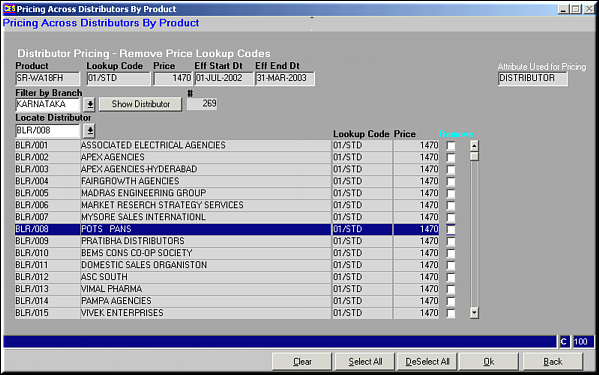
| | Enter Branch code to get a list of all distributors under given Product-Price Lookup Combination. Select Pricing to be removed using  titled "Remove?" and click OK to remove pricing for selected distributors. Specific distributor can be located using Locate Distributor. titled "Remove?" and click OK to remove pricing for selected distributors. Specific distributor can be located using Locate Distributor. |
| | |
| | |
| Change Pricing | Change Pricing from one Lookup to another for Distributor
|
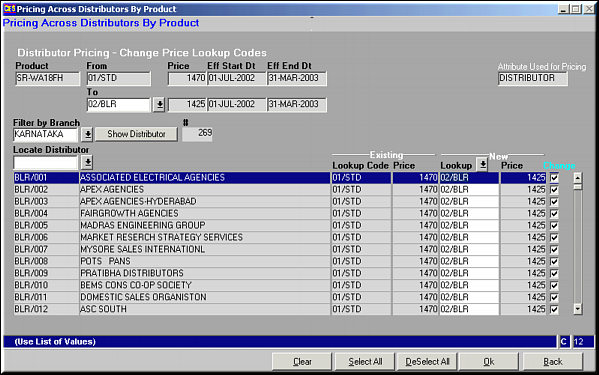
| | Enter Lookup to change to and Branch Code. List of all distributors for the branch with the "From" lookup code is displayed. Use to select/ deselect distributor for price change and click OK to save. |
| | |
| New Pricing | Set New Pricing for Distributor
|
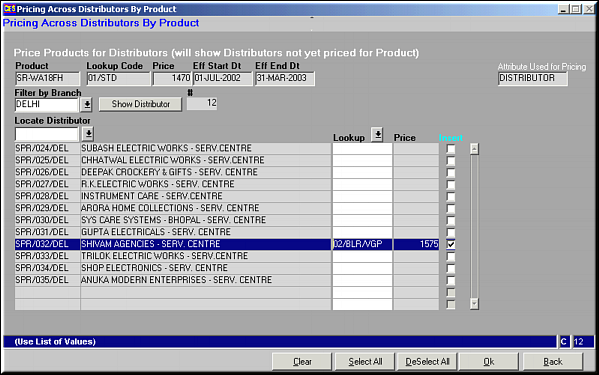
| | Enter Branch to filter by to get a list of all distributors with the selected price lookup. Locate distributor and change the pricing. Select using and click OK to save. |
| | |
| Pre-requisites | |
| | |
| Notes | Click Clear to clear the screen.Click Select All to select all Distributors.Click Deselect All to deselect all distributors. |