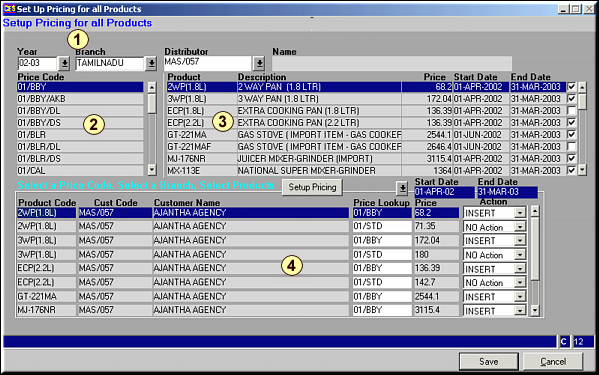
 . Now Click on Setup Pricing.List of product pricing for distributor is seen in Area 4. Make necessary changes and click Save to commit changes.
| Setup Pricing for all Products (PR42) | Previous Top Next |
| Function | Setup pricing for multiple products across distributors for a given area. |
| How To Use | Setup Pricing |
| Enter Year ID, Branch and Distributor code in Area 1 for whom to setup pricing.Select Price Code given in Area 2.Products under the Price Code are displayed in Area 3. Select products for which pricing needs to be set up using the . Now Click on Setup Pricing.List of product pricing for distributor is seen in Area 4. Make necessary changes and click Save to commit changes. | |
| Pre-requisites | |
| Notes |