Enter values
| Register Cost Elements (PR01) | Previous Top Next |
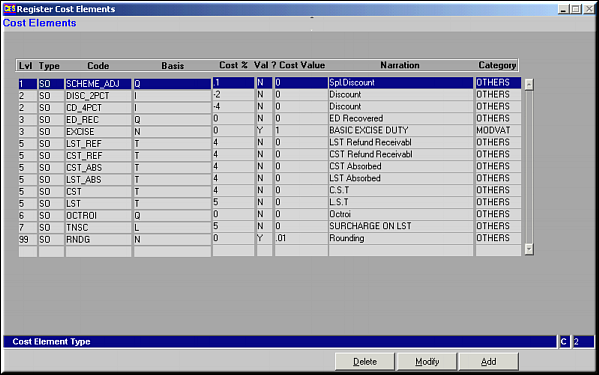
| Function | Facility to register and maintain the cost elements to product pricing | |
| How To Use | List of Cost Elements | |
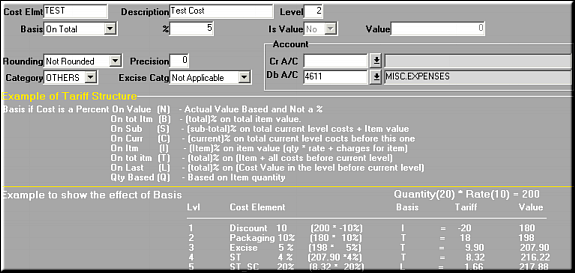
| Add | Add a Cost Element Enter values | |
| Cost Element | ||
| Description | ||
| Level | Level at which cost element is to be applied. See Example on the screen | |
| Basis | The base on which cost element is applied. Give "Value" if it is a straight value, else select the base on which % is to be applied. | |
| % | The actual percentage. (Applicable if Basis is not set to Value) | |
| Is Value | Yes / No | |
| Value | The actual value (Applicable if Is Value is set to Yes) | |
| Rounding | Not Rounded / Rounded / Round Up / Round Down | |
| Precision | Decimal to which to be rounded | |
| Category | MODVAT / CVD / OTHERS | |
| Excise Category | Not Applicable / Basic Excise Duty / Additional. Custom Duty / Other Duty | |
| Debit and Credit A/c | Account codes to be debited / credited. | |
| Click OK to save | ||
| Modify | Screen similar to Add facility shows Cost Element details. Make necessary changes and click OK to save. | |
| Delete | Click to delete a selected cost element. Screen shows cost element details. Click OK to confirm deletion. | |
| Pre-requisites | ||
| Notes | ||