| Function | Facility to maintain summarization on various items. Use this facility to create items that will be a summary of various other items like accounts, account groups, sections, schedules or sub-schedules. These summary items are in turn referred to in Presentation Setup (FS05). |
| | |
| How To Use | Maintain Summary Details
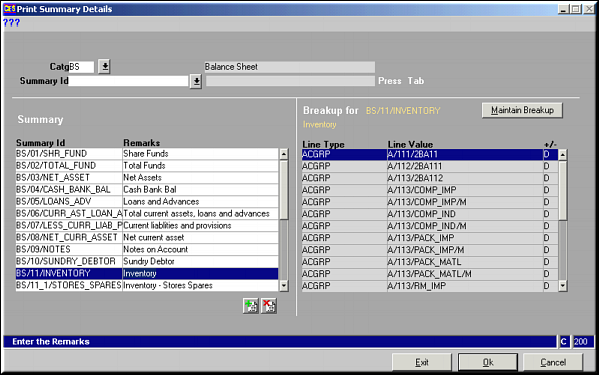
Enter the Category and Summary ID to filter by and press to view summary items and breakup details. Use buttons  and and  to add / delete Summary items. Remember to give unique Summary IDs. to add / delete Summary items. Remember to give unique Summary IDs.
Click Maintain Breakup to modify breakup details for selected summary item. |
| | |
| Breakup Details | Breakup for Item
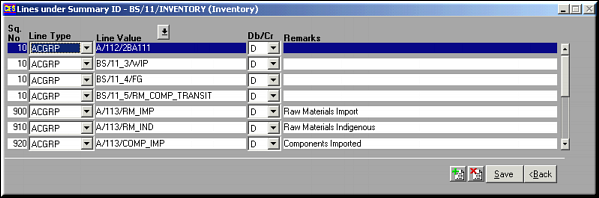
Enter Values for fields and click Save to save details and quit. |
| | Sequence No | Order of printing |
| | Line Type | One of AC / ACGRP / SCH / SUBSCH / SECTION |
| | Line Value | Value to be mapped on to based on selection above. |
| | Db / Cr | D – add item in summary / C – subtract item from summary |
| | Remarks | Any remarks as may be needed. |
| | |
| | Click OK on completion of all operations to save changes made. |
| | |
| Pre-requisites | |
| | |
| Notes | |