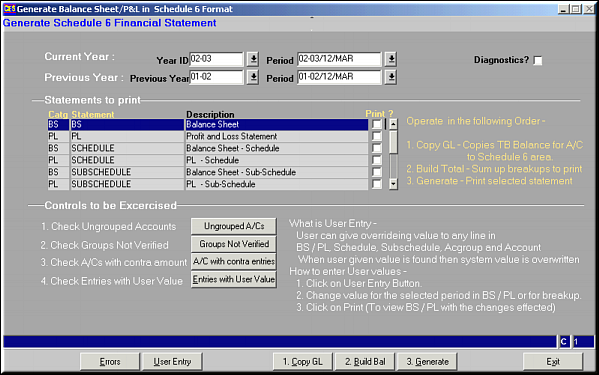
Enter the Year ID and period label for current and previous years.Select the Statements to be printed using the checkbox.

Click Ungrouped A/Cs to view list of ungrouped accounts.
Click Groups Not Verified to view list of account groups that have not been verified and flag set as "Y".
Click A/c with contra entries to view a list of accounts where net balance in the account is negative.
Click Entries with User Value to get a list of all entries that have been entered by the user and not generated by the system.
2.Build Bal: Sums up the breakups to be printed.
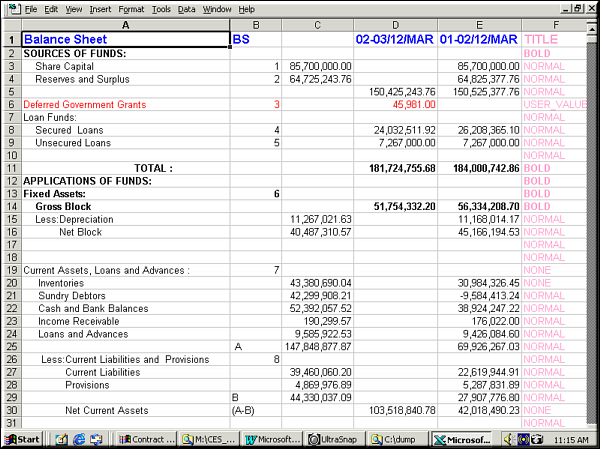
3.Generate: Generates the Actual Excel sheet with the statement.
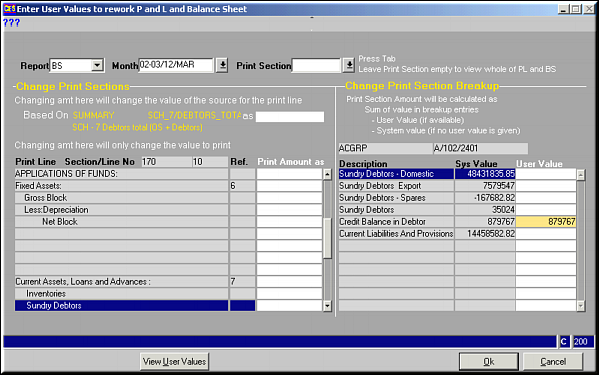
Enter the filtering criteria in Area 1.
Enter the amount to be printed in the statement by changing the source in Area 2.
Enter the amount to override all sources and print the value in the statement in Area 3. This has highest priority.
Enter the amount to be printed under User Value in Area 4.
Click OK to save changes and exit.