View FG Stock Status (FG61) Previous Top Next

 
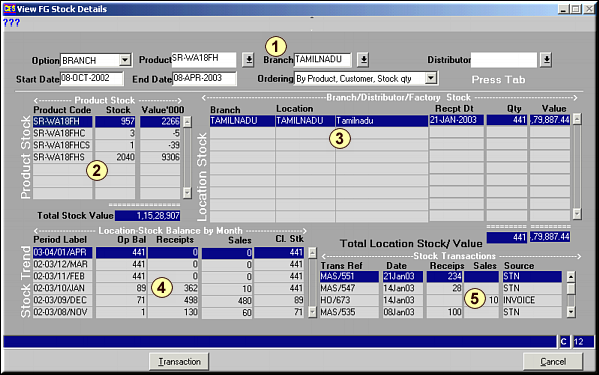
FunctionFacility to view the Finished Goods Stock Status across any branch, any product and any distributor for a specific date range.
  
How To UseFG Stuck Status

Area 1: Enter the Criteria to filter by and Press to get the FG Stock Status by Branch by Distributor.Area 2: Total Product Stock across all branches.Area 3: Stock at the Branch selected in Area 1Area 4: Stock at the Branch at the end of each month in the selected date range.Area 5: Transactions made on the product during the period with the date range specified.Click Transaction to view a list of all transaction of the product.Click Cancel to clear screen and run a new query.
  
Pre-requisites 
  
Notes