| Function | Make a voucher entry against budgeted sanctions. |
| | |
| How To Use | |
| | |
| Voucher Entry | Voucher Entry.Steps are same as in regular Voucher Entry (FA08)Enter Year ID and Period LabelEnter the Auto numbering Doc typeEnter Voucher Key DetailsEnter Event AnalysisClick Next to move to Sanctions Screen |
| | |
| Select Sanction | Select Sanctions
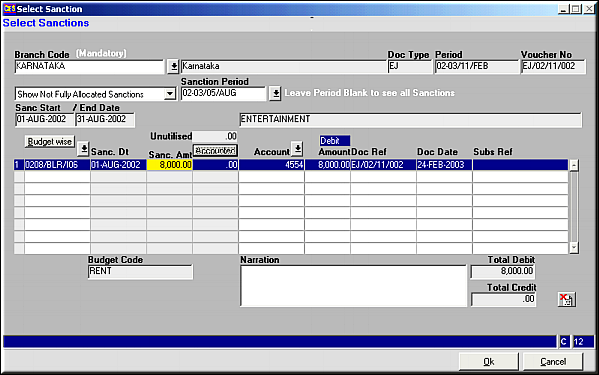
Enter the criteria by which sanctions should be filtered and click Budget-wise to get a list of sanctions by budget or click on

to get a list by sanction number.Select the sanction to be accounted.Enter amount of utilization.Click OK |
| | |
| Entry against Sanction | Entries to Voucher.

The first line of entry is automatically populated.Enter rest of the details and Click Raise Voucher to save changes |
| | |
| Pre-requisites | None |
| | |
| Notes | The Get Bill facility may be used to match a bill against this voucher. |