| Function | Comprehensive view of an entire Account Structure in tree format along with Period Balances. |
| | |
| How To Use | |
| | |
| Account Balances | View of all Accounts
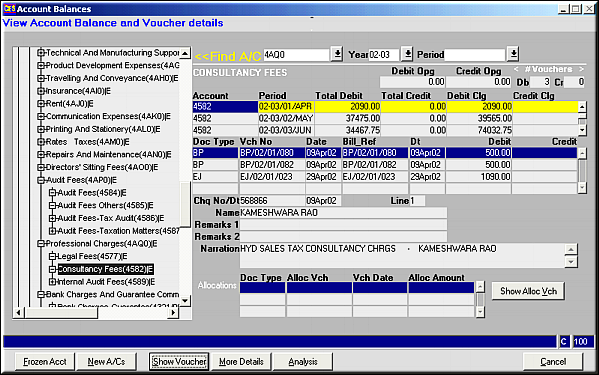
The left side of the screen shows the entire structure of accounts with all control accounts and sub-accounts.Click on (+) to open up sub-accounts and (–) to collapse it.Double click on any account to know its balance across periods.Any vouchers that may exist are also displayed.Alternately, search can also be done restricted to an account, Year or Period. |
| | |
| Frozen Accts. | Click to get a list of all accounts that have been frozen. |
| | |
| New A/C's | Click to get a list of all newly created accounts. |
| | |
| Show Voucher | Click to get voucher details of the currently highlighted voucher. |
| | |
| More Details | Click to view additional details |
| | |
| Analysis | Click to view Event Analysis for the selected Voucher. |
| | |
| Show Alloc Vch | Click to view the allocation voucher against the currently highlighted voucher. |
| | |
| Pre-requisites | |
| | |
| Notes | |