| Function | Raise a voucher and allocate it against a bill. |
| | |
| How To Use | |
| | |
| Entries | Operation is similar to the facility Voucher Entry (FA08)Steps beingEnter Year ID and Period LabelEnter the Auto numbering Doc typeEnter Voucher DetailsEnter Event AnalysisMake Voucher Entry |
| | Note that there are two added buttons to the screen.
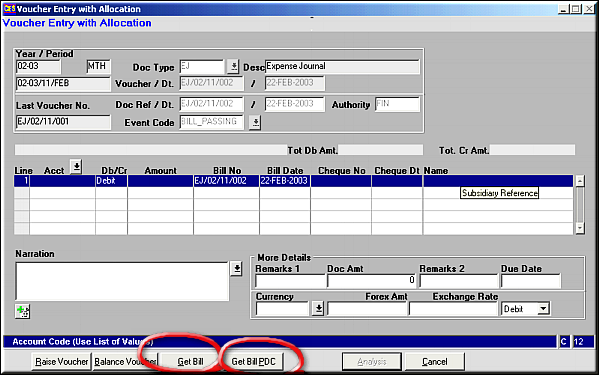
Enter the details as explained in Voucher Entry (FA08) and click Get Bill to get lines for allocation. |
| | |
| Get Bill | Filter to restrict Allocation Lines.
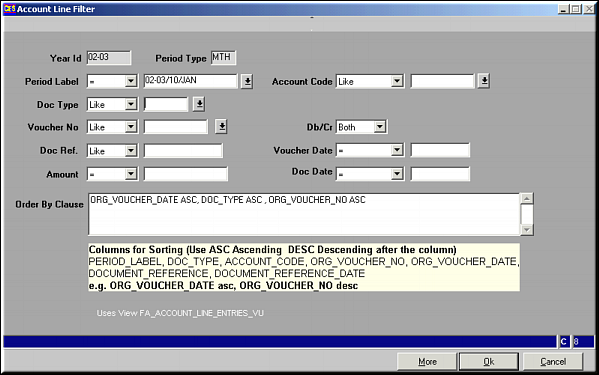
Enter details into the fields and click OK to fetch the lines. |
| | Select Allocation Lines
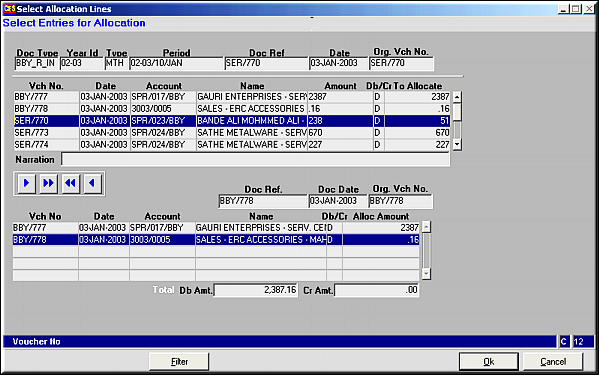
Use buttons

to select/deselect any/all lines.Click OK to confirm selection. Control is transferred back to Voucher entry screen.Click Raise Voucher to save the voucher details along with Allocation. What is Allocation |
| Get Bill PDC | Operation similar to Get Bill. All Lines with Post-dated Cheques (PDC) are displayed. |
| | |
| Pre-requisites | Debit and Credit accounts entered should already be registered as accounts.Bills should be registered for given customer. |
| | |
| Notes | |