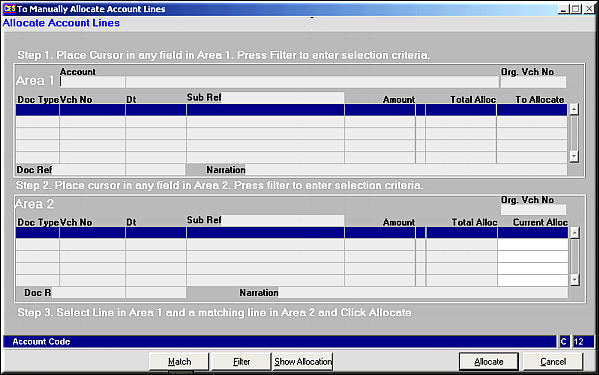
Place cursor in Area1 and click filter to get unallocated lines.
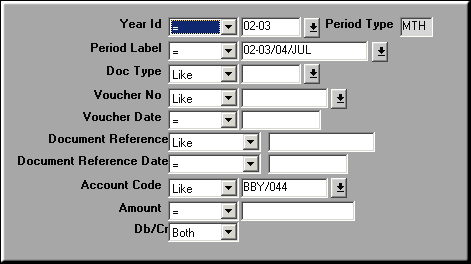
Enter values to filter by and click OK
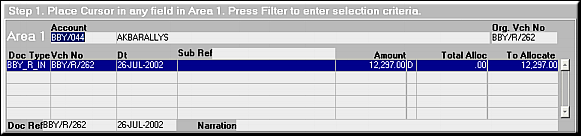
Place Cursor in Area2 and click Filter.
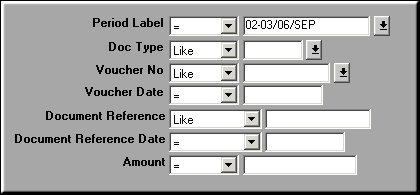
Enter values to filter by and click OK
Click Allocate to link up the two lines.
| Allocate Account Lines (FA14) | Previous Top Next |
| Function | Manually allocate account lines. |
| How To Use | |
| Place cursor in Area1 and click filter to get unallocated lines. | |
| Filter Area 1 | Enter values to filter by and click OK |
| Area 1 | Data pertaining to Area1 are shown. Place Cursor in Area2 and click Filter. |
| Filter Area 2 | Enter values to filter by and click OK |
| Area 2 | Unallocated lines against the Area1 account codes are displayed. Click Allocate to link up the two lines. |
| Allocate | Click to link up the two accounts lines and save it to database. |
| Match | Click to find similar line in other area in case of existence of multiple unallocated lines. |
| Show Allocation | Click to see all existing allocations to the highlighted account line. |
| Pre-requisites | None |
| Notes |