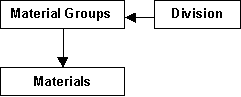
Setting up the PSL for Extraction of Receipts and Issues Information on Stock is maintained by Division / Material Group/ Subtype (Imported/Local). Posting of the consumption entries to the GL can also be done.
Set up of the PSL is done as follows.
Identify the Divisions/Segments for reporting Stock and Consumption figures (viz. COOKER, MIXIE, TRADED etc..) Identify the broad categories / groups of materials within these segments viz. (Raw materials, Packing, components, consumables, others) Group the materials in the categories and assign the Division / Segment to the groups using the facility (PS02)
Identify the accounts to be used in the Priced Stores Ledger vis-à-vis the GL viz. Raw material, Packing material, Consumables using the facility (PS06) Next the Basis / Criteria for for identifying the Stock movements to be grouped under a segment/Group/Subtype (Imported/Local) is determined. An example is shown below CRITERIA for classifying an Issue / Receipt Material Group (R_RM, R_CONS, R_PACK, M_RM) ORIGIN (Imported Duty Free, Duty Paid, Local) Issue / Receipt identification through CES_FUNCTION Code SETS indicating the various combination values for the above A/C Codes for posting to GL is identified for each of the above sets
Rules for assigning the account codes Db A/C Cr A/C SET 1 R_RM, Duty Free, RECEIPT Purchase N/A SET 2 R_RM Duty Free ISSUE Consumption Purchase
Use facility PS03 Maintain Stock Movement Property (Read Property as Criterion ) Define the criterion Assign the allowed values for each criterion Associate the function which would evaluate the value for this criterion from the Issue or receipt.
Use facility PS04 Define and maintain A/C derivation Rule to define the rules for identifying whether a movement is Issue or receipt (Through CES_FUNCTION_CODE) for each combination of the criteria (SET) the Debit A/C code and Credit A/C code can be specified.
For ease of identification all the SET combinations which have to be grouped for purposes of a ledger can be assigned a default TEMPLATE ID useful for building the Ledger Template Inclusion / Exclusion.
For example all Sub Contract Receipts and Issues sets can be given a Template Id sub-contract so that we can associate this with a ledger Subcontract which would normally map to a Physical store.
Use facility PS07 Maintain Template for Ledger A/C Inclusion Exclusion (Segment) to build the TEMPLATE for a Ledger with respect to Inclusion / Exclusion of combinations. This ledger Template is associated with the ledger whenever a new ledger is defined. PS11
Ledger Template is suggestive of the Divisions to be considered for maintaining balance.
For example all Rice cooker and Mixie Receipts and Issues sets can be given a Template Id Production so that we can associate this with a ledger Production which would normally map to a Physical store GENL.
Hence when we associate this template with the ledger only those movements which have been translated to the A/C combinations given on the template will be included in the ledger