| Function | First stage in an asset transfer. Location transfer document is raised |
| | |
| How To Use | |
| | |
| Query Screen | Location Transfer Documents under Processing
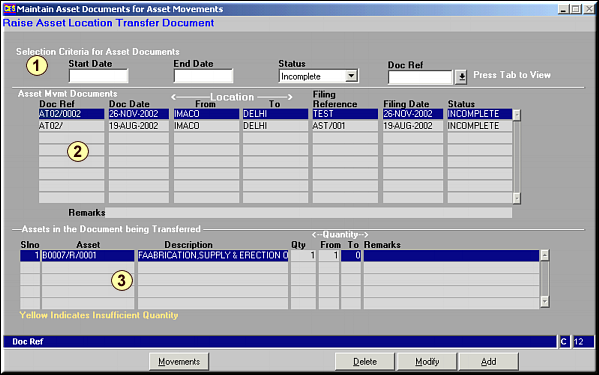
Area 1: Enter Criteria for selection.Area 2: Details of Asset Movement Documents.Area 3: Details of entries under each Document. |
| | |
| Add | Add Transfer Document

Enter the Autonum Doc Type.
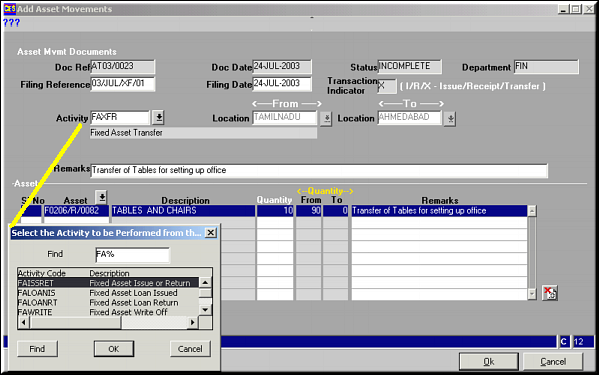
Enter the Filing Reference, Date, From and To Locations, the Assets to be Transferred, and the Quantities.Click OK to save details.Use  to delete lines created. to delete lines created. |
| | |
| Modify | Click to modify a selected document.Screen similar to Add facility is opened.Make necessary changes and click OK to save. |
| | |
| Delete | Click to delete a transfer document.Screen showing transfer document details is seen. Click OK to confirm deletion. |
| | |
| Movements | Click to view any movements available under the asset. |
| | |
| Pre-requisites | |
| | |
| Notes | |