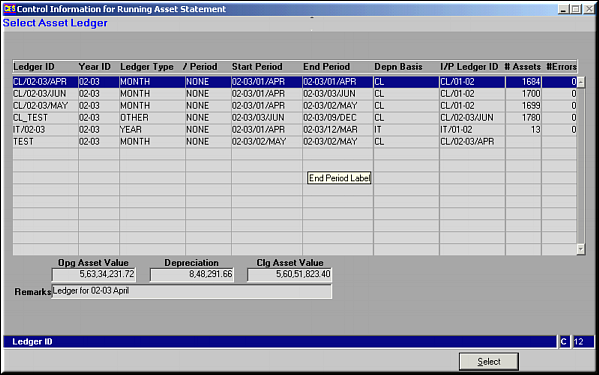
Click Select to select a ledger.
| Run Assets Ledger (AS33) | Previous Top Next |
| Function | Facility to run the Assets Ledger and arrive at asset balances at the end of a period. |
| How To Use | |
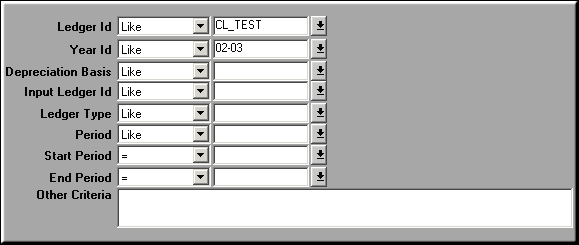
| Filter | Filter for Ledger ID |
| Query Screen | List of Open Ledgers Click Select to select a ledger. |
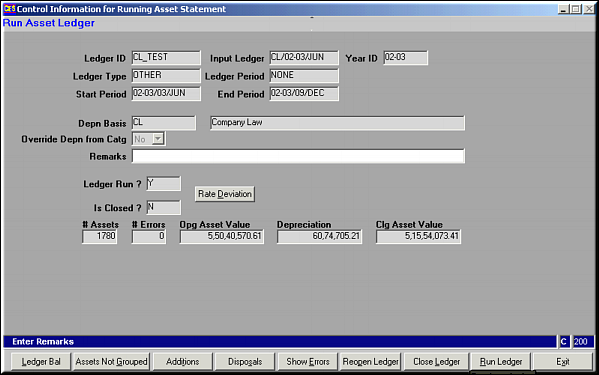
| Select | Ledger Details |
| Ledger Bal | Click to view a list of Asset Ledger Balances |
| Assets not Grouped | Click to get a list of all assets under the ledger ID that have not been grouped. |
| Additions | Click to view a list of all additions made to all assets under the selected ledger. |
| Disposals | Click to view a list of all disposals made to all assets under the selected ledger. |
| Show Errors | Click to view any errors in the ledger run. |
| Reopen Ledger | Click to Reopen a ledger that has been closed. |
| Close Ledger | Click to Close a Ledger |
| Run Ledger | Click to run the Ledger. Account balances are reworked, depreciation is calculated and closing balance is worked. |
| Exit | Click to exit facility. |
| Pre-requisites | |
| Notes |