Fields Entered
| Asset Ledger Control (AS32) | Previous Top Next |
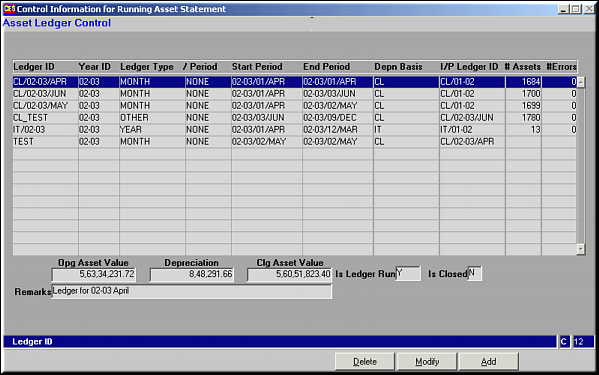
| Function | Maintain Asset Ledger Controls | |
| How To Use | ||
| Query Screen | List of Registered Ledgers | |
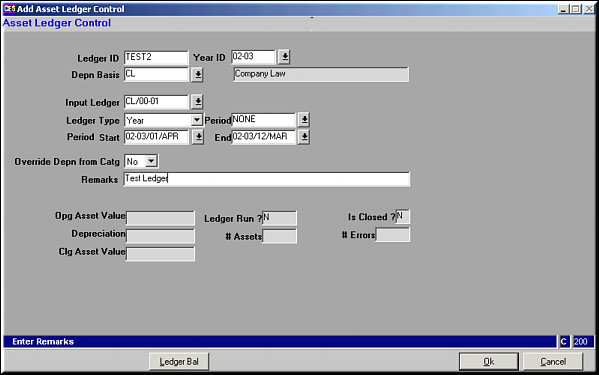
| Add | Register New Ledger Fields Entered | |
| Ledger ID | ||
| Year ID | ||
| Depreciation Basis | Like CL/IT | |
| Input Ledger | Already existing ledger ID from which ledger balances need to be picked up | |
| Ledger Type | One of Quarter / Half-Year / Year / Month / Others | |
| Period | Period of ledger run based on Ledger Type above | |
| Start and End Period | ||
| Override Depreciation from Category | Yes/No | |
| Remarks | ||
| Ledger Bal | Facility is same as explained in LedgerOpening Balance (AS31) | |
| Modify | Click to Modify Ledger details. Screen similar to Add facility is seen. Make necessary changes and click OK to save. | |
| Delete | Click to delete a ledger. Screen showing ledger details is seen. Click OK to confirm deletion. | |
| Pre-requisites | ||
| Notes | When an Input Ledger ID is specified, ledger balances can be viewed only after the asset ledger has been RUN – Run Assets Ledger (AS33) | |