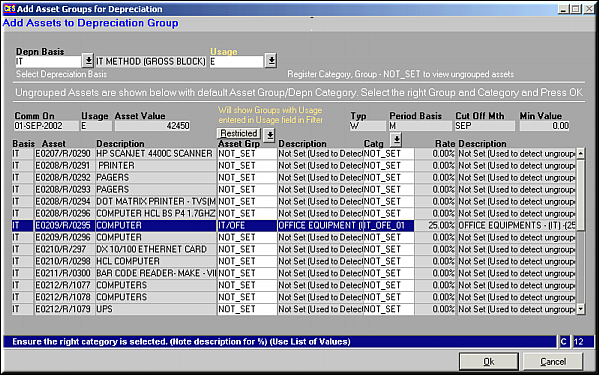
List of all Unclassified Assets subject to the Depreciation Basis and usage restriction is shown.Select the Asset to be classified and Enter its Asset Group and Category.Click OK to Save Changes
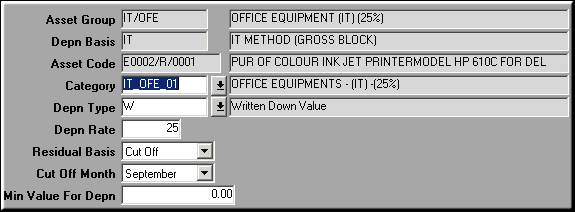
Make necessary changes and click OK to save.
| Asset/Group/Depreciation Linking (AS22) | Previous Top Next |
| Function | Create the link between asset, asset group and depreciation category. |
| How To Use | |
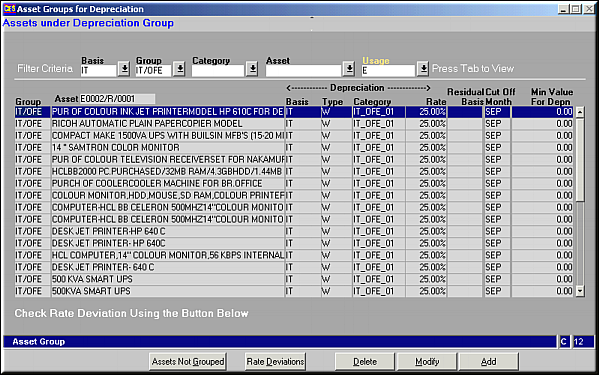
| Query Screen | List of Assets and Depreciation |
| Add | Add Depreciation Method List of all Unclassified Assets subject to the Depreciation Basis and usage restriction is shown.Select the Asset to be classified and Enter its Asset Group and Category.Click OK to Save Changes |
| Modify | Click to make changes to asset depreciation. Modify Asset depreciation Make necessary changes and click OK to save. |
| Delete | Click to delete a depreciation method. Screen displaying depreciation details is seen. Click OK to confirm deletion. |
| Rate Deviations | Click to view any deviations in rates of assets. |
| Assets not Grouped | Click to view a full list of assets which haven't been grouped and hence depreciation has not been setup. |
| Pre-requisites | |
| Notes |