Absorb Sanctions
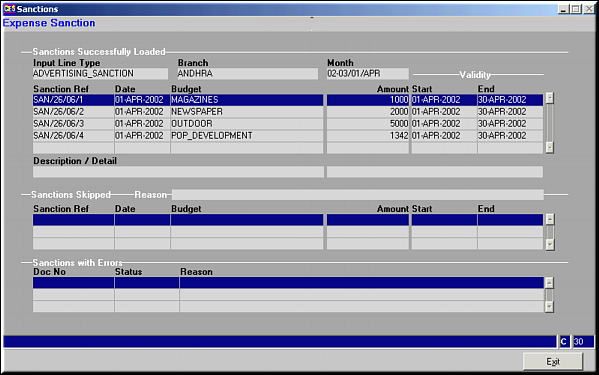
Screen shows Sanctions successfully loaded, sanctions skipped and Sanctions with errors.
| Load Sanction (From Excel) (BD71) | Previous Top Next |
| Function | Facility to load sanctions from a MS-Excel file. The Excel worksheet is given as a template to the user specifying precisely the fields to be entered and the number of rows that can be entered into the file. |
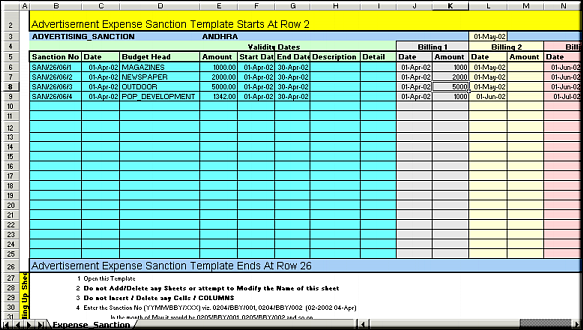
| How To Use | Sample Excel Worksheet Absorb Sanctions |
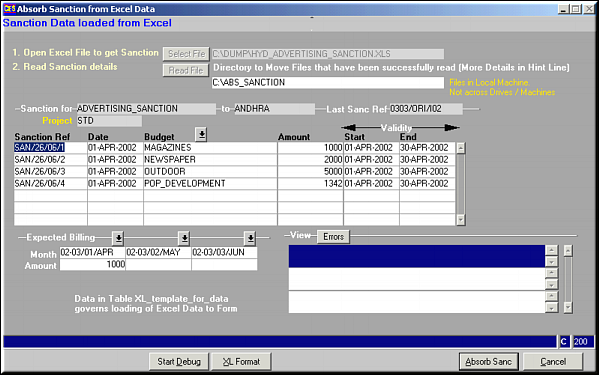
| Area 1 | é0Click on Select File and select a file through the interface provided. Click on Read File to read the file. On successful absorption of sanctions, the file is moved to the directory specified in line 2. |
| Area 2 | Details as read from the file are shown here. |
| Area 3 | The Billing Details as entered in the Excel worksheet are displayed here. |
| Area 4 | Any errors arising during sanction absorption are shown here. |
| Start Debug | Click this button before clicking Read File to get a step by step confirmation of the process being done. The button changes to End Debug – click to stop the confirmations. |
| XL Format | Click to get a screen shot of the format of Excel file to be used. |
| Absorb Sanc | Sanctions Absorbed Screen shows Sanctions successfully loaded, sanctions skipped and Sanctions with errors. |
| Pre-requisites | |
| Notes |